n8n Starter Session · Bayer
Intro 01 / 00

Automate your work with n8n
- starting today.

A hands-on starter session for Bayer PH. No code, no prior experience needed - you'll build two real workflows yourself and leave thinking "I could automate this in my job."

What is n8n? Chat with an AI Agent A scheduled invoice email Quiz & ideas
Today's plan · 09:00–12:00 CET

Four hours: a live demo, two workflows, three short breaks.

09:0009:20
🧠

Welcome & what is n8n

n8n as the glue between your systems and AI. A tour of the canvas, nodes, and execution view.

20 min
09:2009:30
🎬

End-to-end demo

A live run of both finished workflows - see the destination before we build it.

10 min
09:3010:30
💬

Workflow 1 · Chat with an AI Agent

Build an AI Agent, give it a tool, and chat with it live - nodes, execution view, tool calling.

60 min
10:3010:45

Break

15 min
10:4511:35
🗄️

Workflow 2 · Fetch & clean the invoice data

The schedule trigger pulls the invoice data and shapes it - the first half of the automation loop.

50 min
11:3511:50

Break

15 min
11:5012:30
📧

Workflow 2 · Compose, send & run it live

Build the email, run the workflow end to end, and watch it land in your own inbox.

40 min
12:3012:40

Break

10 min
12:4012:50
🎯

Quiz & your ideas

A quick quiz and a brainstorm of what you could automate in your own work.

10 min
12:5013:00
🙋

Q&A · open floor

Bring your questions - about today's builds, the bootcamp, or automating your own tasks.

10 min
Aemal Sayer
Your trainer

Aemal Sayer

CTO & Co-Founder · Avanai

Avanai is an n8n expert partner, working with Bayer to deliver hands-on n8n enablement. I help teams go from zero to building real automations - exactly like the two you'll build today.

n8n expert partner AI automation Bayer enablement
The big idea

n8n is the glue between your systems and AI.

Think of every tool you use - email, databases, spreadsheets, approval systems, AI models - as an island. n8n is the bridge between them. You connect steps (called nodes) into a workflow, and n8n runs them in order, passing data from one to the next. That's the whole concept.

🧩

Nodes

Each box is one step - "fetch this data", "send that email", "ask the AI". You add them from the node panel and wire them together on the canvas.

🔗

Workflows

A chain of nodes from a trigger to an outcome. Data flows left to right. No buttons to press once it's running - it just works.

🔎

Executions

Every run is recorded. The execution view shows exactly what each step did and what data came back - your window into the workflow.

🧭 What n8n is not, today: it's not a tool for building forms or user interfaces. We use it to connect systems and AI - that's where its power is.

How it starts

Every workflow begins with a trigger.

A trigger is the event that kicks a workflow off and hands it the first piece of data. Pick the one that fits the job - the rest of the nodes just follow. You'll use two of these today.

💬

Chat / Manual

You start it - a chat message or a one-click run.

Schedule

Runs on a clock - every hour, every morning, every Monday.

🔔

App event

"New email", "row added", "form submitted" - n8n reacts on its own.

🌐

Webhook

Another system calls n8n directly with a URL to start the flow.

🔌 And it connects to everything: 400+ ready-made app integrations, 30+ AI model nodes (OpenAI, Claude, Gemini), and an HTTP node that can reach any API on the planet - so nothing is off-limits.

Where teams use it

From a single email to a full AI agent.

The same building blocks cover a huge range of work. A few patterns teams automate every day:

📧

Reports & alerts

Pull data on a schedule, format it, and email or Slack it - exactly like Workflow 2 today.

🤖

AI agents & chatbots

Answer questions over your own data, call tools, and take actions - like Workflow 1.

🎫

Support automation

Triage tickets, draft replies, look up orders, and escalate the tricky ones.

🔄

Data sync

Keep CRM, spreadsheets, and databases in step without copy-paste.

🛡️

IT & security ops

Enrich alerts, automate routine fixes, and cut response time.

📄

Document extraction

Read invoices, forms, and PDFs with AI and push the data where it belongs.

📈 Real results: Field Aerospace cut proposal drafting from two weeks to ~25 minutes. Koralplay now auto-resolves 70% of payment tickets. Vodafone saved £2.2M automating threat intelligence.

Beyond today's session

Built to run in a regulated enterprise.

The same tool you're learning today scales straight to production - which is why 34% of the Fortune 500 already run on n8n.

🔒

Security & control

Self-host or cloud, SSO / SAML, SOC 2, and secrets in Vault, AWS, or Azure - your data stays yours.

👥

Governance

Project-level access, Git as the source of truth, and separate dev & production environments.

📊

Confidence at scale

AI evaluations before you ship, 200+ executions/sec, and an insights dashboard to prove ROI.

🏢 In good company: Meta, Microsoft, Vodafone, and Zendesk build on n8n. Source: n8n.io/enterprise

Built to grow

From one workflow to millions of runs.

The workflow you build today on a laptop is the same workflow that runs in production - you don't rebuild it to scale, you just add capacity behind it.

⚙️

Queue mode & workers

Hand executions to a pool of worker processes. Need more throughput? Add more workers - no workflow changes.

🔁

Multi-main & failover

Run several main instances with automatic failover, so a single node going down doesn't stop the line.

📈

High throughput

200+ executions per second on a tuned setup - enough to drive real, business-critical volume.

🩺 And you can see it all: execution logs stream into your own monitoring stack, and the insights dashboard tracks runs, failure rates, and time saved as you scale up.

Your toolkit

The nodes you'll use across both workflows.

Every step in n8n is a node. Here's the full set we'll touch today - tick each one off as we cover it.

NodeWhat it doesUsed in
Chat TriggerOpens a chat box so you can talk to the agentWF 1
Manual TriggerRuns the workflow on demand with one clickWF 2
AI AgentReasons, calls tools, and produces the answerBoth
OpenAI Chat ModelThe LLM "brain" attached to the AI AgentBoth
HTTP Request ToolLets the agent fetch data from an API as a toolWF 1
HTTP RequestCalls Databricks, and sends the email via GraphWF 2
Edit Fields (Set)Sets values - here, the recipient addressWF 2
CodeCustom JavaScript - shapes data & builds the emailWF 2
Split OutSplits a list into one item per invoiceWF 2
Structured Output ParserForces the agent's output into a fixed JSON shapeWF 2
AggregateRecombines the items back into one listWF 2
Live Demo
🎬

Let's see it run, end to end.

Before we build anything, here's the destination. A quick live run of both finished workflows - the AI Agent you can chat with, and the scheduled invoice email landing in the inbox.

Before we build - get set up

Follow every click, live, on your own screen.

We'll use AvaStage to keep you in sync. It mirrors my screen to your device with a fresh screenshot every 3 seconds - miss a click? Rewind and replay it at your own pace. Got a question? Post it in AvaStage and upvote others'. I'll jump back in regularly to answer them, so don't hold your questions to the end - fire them in as they come.

1 · Open avastage.avanai.io
2 · Enter code
4827
Open AvaStage in a new tab →
📸 New screenshot every 3s Rewind to any click 💬 Ask & upvote questions
You build this!
01

Chat with an AI Agent

Your first workflow. An AI Agent that answers questions by calling a tool to fetch live data - and you'll talk to it.

Download workflow JSON
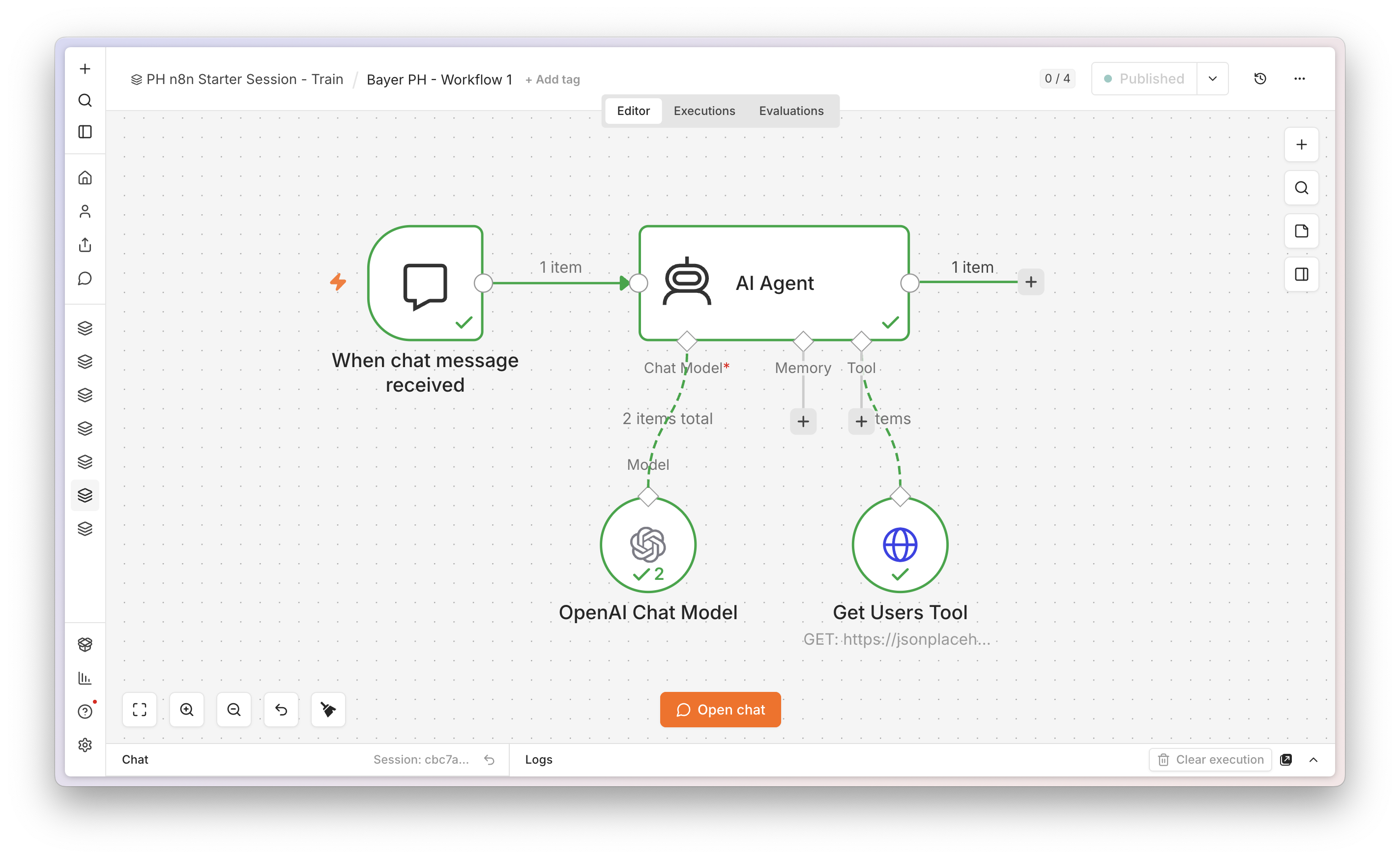
Workflow 1 canvas - Chat Trigger, AI Agent, OpenAI Chat Model, and Get Users Tool
No code needed
What we're building

Chat in → agent thinks → agent calls a tool → agent answers.

💬
Chat Trigger
"When chat
message received"
🤖
AI Agent
thinks & decides
🛠️
get_users
HTTP Request Tool

The agent has one tool: get_users, which fetches a list of users from a free, public endpoint. When you ask about users, the agent decides on its own to call the tool, reads what comes back, and answers you. It's the simplest possible way to see tool calling in action.

The three nodes

Three nodes, wired in a couple of clicks.

💬 Chat Trigger
NodeWhen chat message received
Gives youA built-in chat panel to talk to the agent
Connects to→ AI Agent
🤖 AI Agent
Chat modelPre-provisioned credential (no keys to paste)
System prompt"You are a helpful assistant. When the user asks about users, call the available tool to fetch the list, then answer based on the data. Be concise."
Toolget_users (attached below)
🛠️ HTTP Request Tool
Tool nameget_users
Description"Fetches the list of users. Use whenever the user asks about users."
MethodGET
URLjsonplaceholder.typicode.com/users
AuthNone - free & public

🧪 Why this endpoint: it returns dummy users, needs no API key, and never fails in front of a live audience. It's just a clean vehicle to demonstrate tool calling.

Your turn
Live demo · type these in the chat

Talk to your agent. Watch it reach for the tool.

You → "Give me the list of users." Agent → calls get_users, then lists them back. You → "How many users are there?" Agent → calls get_users, counts, answers "10". You → "What is the email of the user named Leanne Graham?" Agent → calls get_users, finds her, returns the email.

🔎 The teaching moment: after each answer, open the execution view. You'll see the tool being called and the data coming back - proof the agent isn't guessing, it's fetching. This is the heart of the first 30 minutes.

Hands-on
🛠️

Now let's build it - step by step.

Time to switch to the n8n canvas and build Workflow 1 together, node by node. Follow along in AvaStage - rewind any step you miss, and keep firing your questions as we go.

Break 1 of 3 · 15 min
15:00

Up next · Workflow 2 · Fetch & clean the invoice data

You build this!
02

Scheduled invoice email

The complete automation loop - data in, logic applied, an email sent - running on its own every morning. Nobody presses a button.

Download workflow JSON
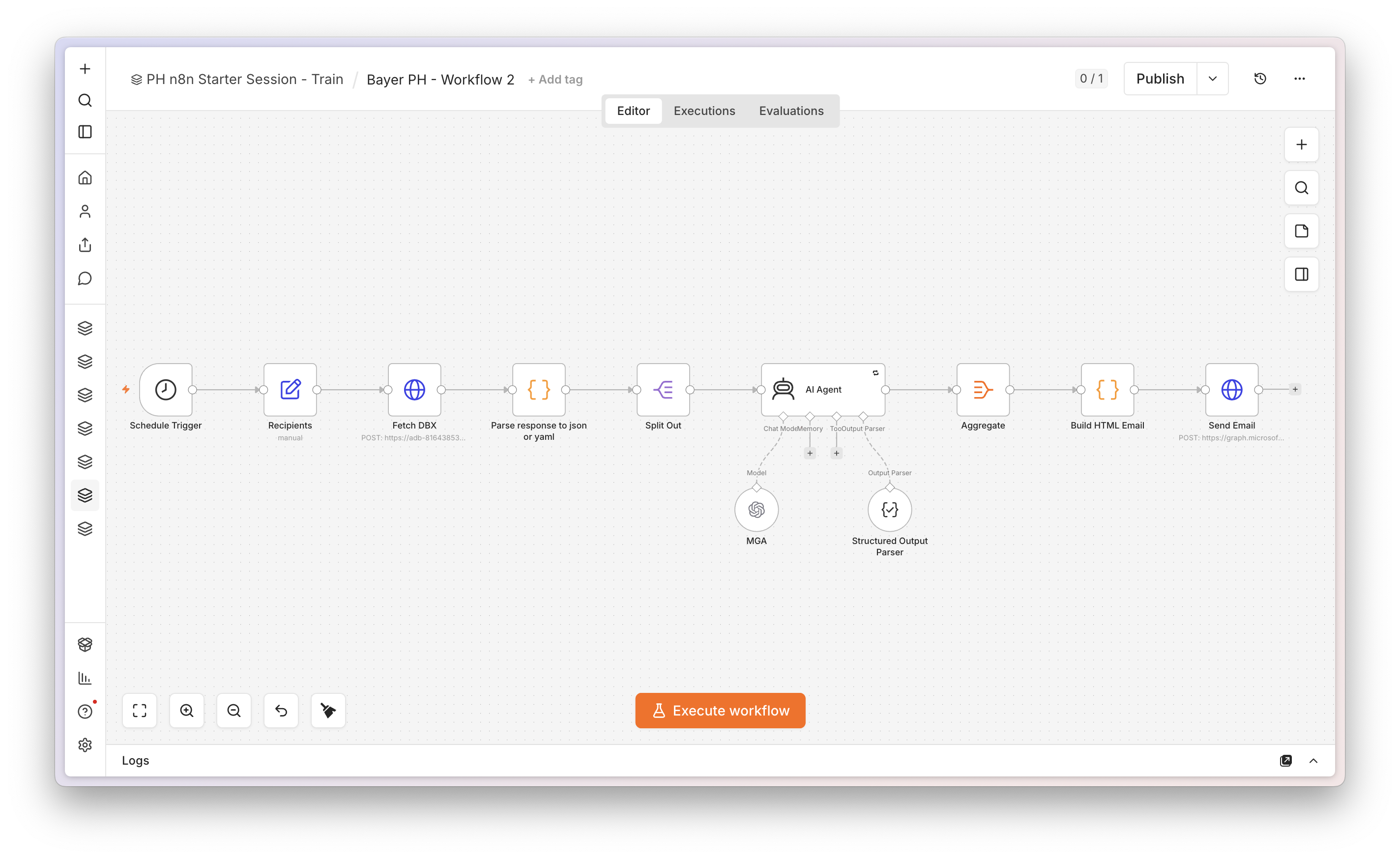
Workflow 2 canvas - scheduled invoice email automation
What we're building

Fetch → clean → send. Every morning at 9 AM.

Schedule Trigger
daily · 09:00
🗄️
Databricks query
invoices due soon
✍️
Compose email
shape the rows
📧
Send Email
to your own inbox

This is the same fetch → clean → send pattern behind countless real automations - just with real-feeling invoice data in the middle. Once the schedule is on, the workflow runs itself: it pulls the invoices due soon, turns them into an email, and sends it. The "we could automate our invoice chasing" moment.

The four nodes

Four steps from a schedule to an inbox.

⏰ Schedule Trigger
RunsDaily at 09:00
MeansThe workflow runs by itself - nobody presses a button.
🗄️ Databricks query
ReturnsInvoices due in the next ~10 days
Columnsvendor, invoice ref, PO, due date, amount, currency
SetupCredential & query pre-provisioned (no SQL, no keys)
✍️ Compose email
DoesShapes the invoice rows into the email content
NodeA simple Set / transform step
Bodyassembled live in the lab
📧 Send Email
Sends toyour own inbox - an address you choose
So thatyou physically receive the result

📨 Each person sends to their own address - not a shared distribution list - so the email lands in a place you control and can open right away.

The payoff

Every morning, your invoices are already triaged.

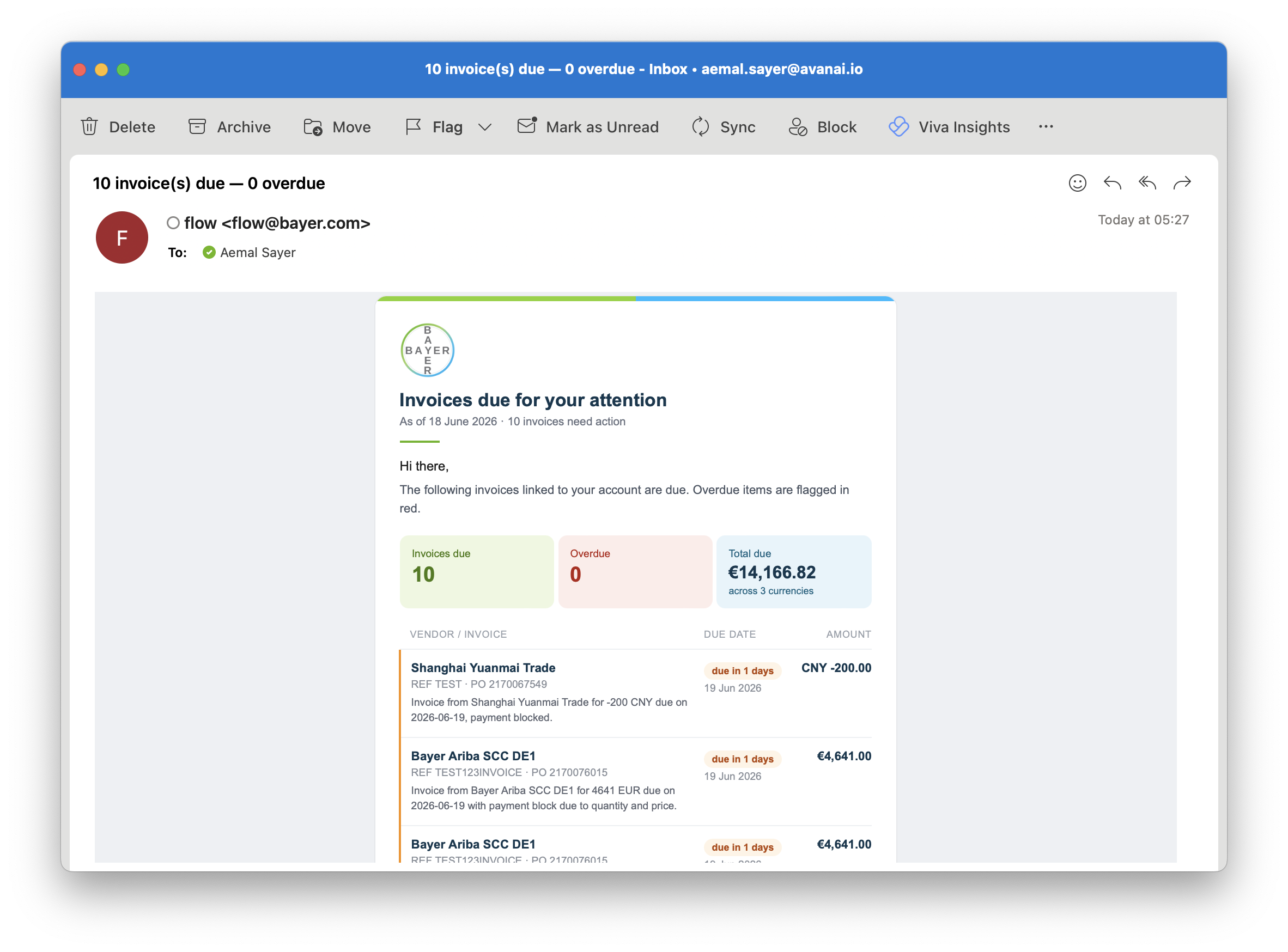
Once this workflow is live it runs by itself - every morning at 9 AM, before you even open your day. You just find the email waiting:

  • 📊
    Top 10 invoices due in the near future, ranked for you.
  • 🤖
    A short AI-generated summary of each one.
  • 🗄️
    Pulled live from Databricks - reflecting your real invoice sources (SmartPay / SAP).
  • No clicks, no chasing - it just lands in your inbox.
Workflow 2 output email - top 10 invoices due soon, each with an AI-generated summary, pulled from Databricks
Hands-on
🛠️

Now let's build it - step by step.

Time to switch to the n8n canvas and build Workflow 2 together, node by node. Follow along in AvaStage - rewind any step you miss, and keep firing your questions as we go.

Break 2 of 3 · 15 min
15:00

Up next · Workflow 2 · Compose, send & run it live

Aha moment
Live demo

Run it once. Watch the email arrive. Then let it loop.

▶️ What we do live
1Run it manually once to show the whole chain execute end to end.
2Open your inbox and find the email that just arrived.
3Enable the schedule - now it would run every morning, unattended.
From here on, the workflow does the chasing for you. That's the spark.
💡

Now imagine your real data

Swap the demo source for your actual invoice, PO, or approval data and this same workflow becomes a vendor-reminder service, an approval nudge, or an overdue-invoice chaser - built by you, running on its own.

Where this goes next

You just built the seed of a bootcamp workflow.

What you built today is a deliberately simplified version of a workflow from the week-long bootcamp. Same backbone - a schedule pulling invoice data and emailing it - but in the bootcamp it grows up.

✅ Today · the starter version

Schedule → Databricks → compose → send. The complete loop, end to end, built by a complete beginner.

🚀 In the bootcamp · the full version

The same workflow plus header enrichment, data tables, caching, and AI analysis of the invoices. Recognise the through-line.

Break 3 of 3 · 10 min
10:00

Up next · Quiz & your ideas

03

Quick quiz

Five questions, multiple choice, just for fun. One of you answers - we reveal together. Confetti if you nailed it.

Quiz Question 1 / 5

What is n8n best described as in today's session?

The answer

n8n is the glue between your systems and AI. It connects the tools you already use and passes data between them - that's the whole idea we built on today. It is not a UI or form builder.

Quiz Question 2 / 5

In Workflow 1, what did the AI Agent use to fetch the list of users?

The answer

The agent called a tool - the get_users HTTP Request - to fetch the data, then answered from what came back. You saw exactly that happen in the execution view.

Quiz Question 3 / 5

What made Workflow 2 run by itself every morning?

The answer

The Schedule Trigger is what makes a workflow run on its own. Set it to daily at 09:00 and the whole chain fires every morning - no button, no person.

Quiz Question 4 / 5

Where do you look to see exactly what each step of a workflow did?

The answer

The execution tab records every run and shows what each step did and what data came back. It's your window into the workflow - and where you saw the tool being called.

Quiz Question 5 / 5

Which of these did we deliberately NOT use today?

The answer

We deliberately avoided Microsoft Teams - to keep from notifying real people we don't control. Each email went to your own inbox instead, so the lab stays safe and self-contained.

Your turn
Now you

What could you automate?

You've now built both patterns - an AI Agent that calls a tool, and a scheduled job that fetches, shapes, and sends. Almost every repetitive task at Bayer PH is some mix of these two. A few starting points:

📨
Invoice chasing

Email vendors automatically when an invoice is overdue.

Approval nudges

Remind approvers about purchase requests waiting on them.

📊
Daily PO digest

A morning summary of new purchase orders, in your inbox.

🤖
Ask-your-data agent

An AI Agent that answers "which invoices are due this week?"

⚠️
Exception alerts

Flag invoices over a threshold or missing a PO reference.

🔁
Vendor onboarding

Route a new-vendor form through the right steps automatically.

?

Q&A · open floor

Anything from today - the AI Agent, the scheduled email, n8n in general, or how this could fit your own work. Ask away.

How would I automate ___? Where does the data come from? Is it safe with our systems? What's next in the bootcamp?

You built two workflows.
Now go automate your job.

You'll get annotated, step-by-step guides for both - and there's a week-long bootcamp when you're ready to go deeper.

Chat with an agent Schedule it & forget it This scales in the bootcamp

Avanai
Avanai · Bayer n8n Starter Session · Thank you
Where we are today

Live timeline

--:--local time
🧠Welcome & what is n8n
🎬End-to-end demo
💬Workflow 1 · Chat with an AI Agent
Break
🗄️Workflow 2 · Fetch & clean the invoice data
Break
📧Workflow 2 · Compose, send & run it live
Break
🎯Quiz & your ideas
🙋Q&A · open floor

Keyboard shortcuts

→ / PgDn
Next slide
← / PgUp
Previous slide
↑ ↓ / Space
Scroll, then advance
Home / End
First / last slide
F
Fullscreen
?
This help

In the quiz: click the option the participant chose to reveal the answer. Use ↺ to reset a question.